E-Suite · Security operations in Microsoft Teams

Turn Microsoft Defender alerts into action, right inside Microsoft Teams

Micro-Vigilant brings Microsoft Defender incidents and alerts into Microsoft Teams, with role-based views, smart notifications and actions your team can take from the notification itself, with full traceability.

Micro-VigilantSummary
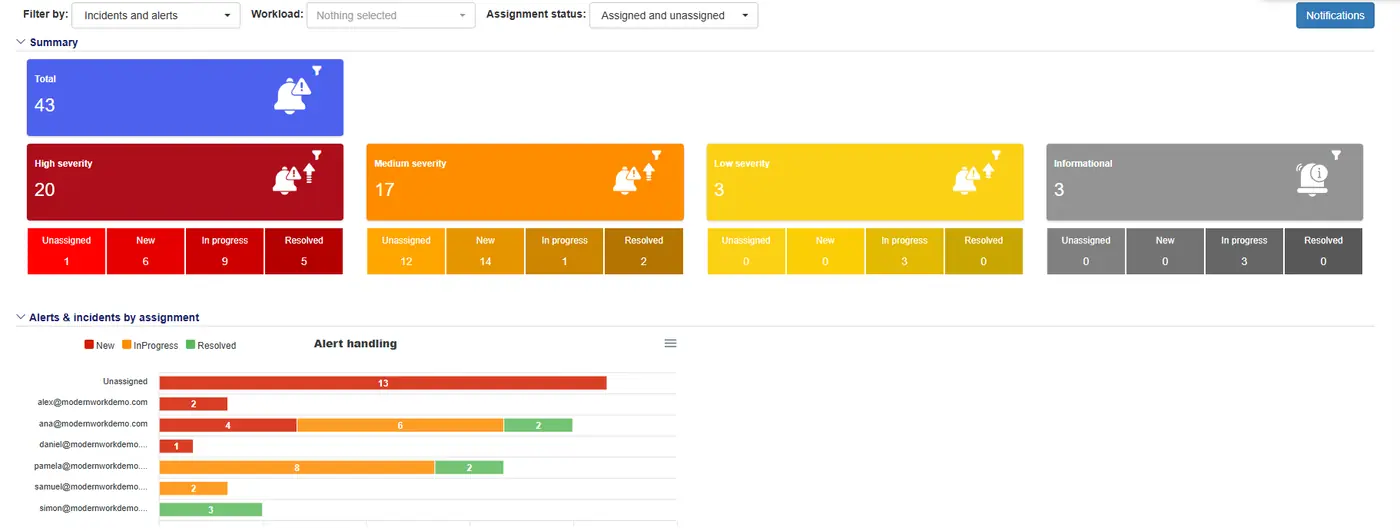
Micro-Vigilant dashboard in Microsoft Teams: incidents and alerts by severity, status and analyst
Micro-VigilantTeams notification · now
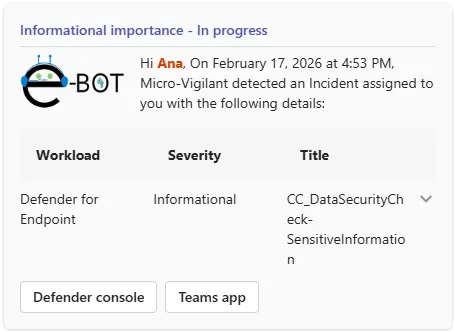
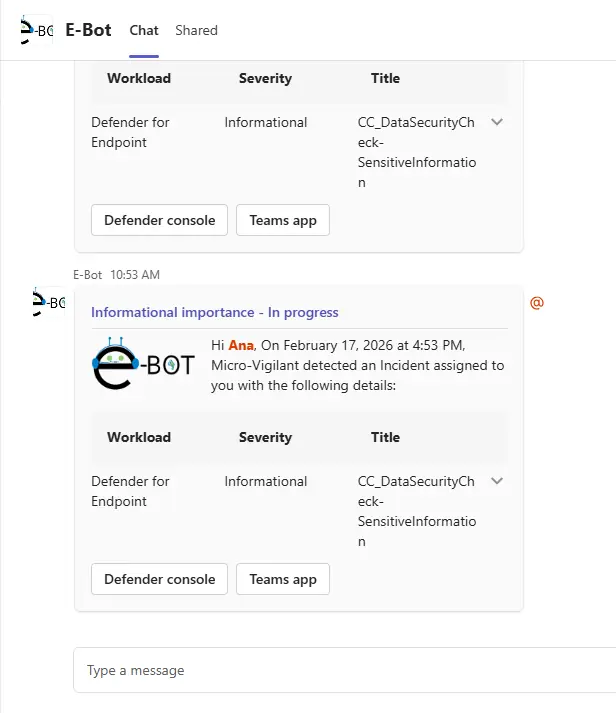
Micro-Vigilant notification card in Microsoft Teams with the workload, severity and title of an incident
Response loggedAction ID verified and recorded
MDEMDIMDOMDA
The challenge

The gap is not the tools. It is operations.

Microsoft Defender detects and prioritizes. Every alert still needs an owner, the business context and a next step, and that is where security teams run out of time.

42%

of alerts still go uninvestigated, even with Microsoft Defender XDR and Microsoft Sentinel deployed.

Microsoft & Omdia, State of the SOC (2026)
UninvestigatedInvestigated
55–60%

of cybersecurity spend goes to people and operations. Tools alone are 35–40%.

Forrester, Gartner, IDC, IBM (2024)
People and operationsTools
180–200

days to identify a breach, out of a 240-day breach lifecycle.

IBM, Verizon, ENISA, Ponemon and others (2023–2025)
IdentifyContain
What Micro-Vigilant does

Five capabilities, one operational experience

I

Operate

  • Microsoft Defender incidents and alerts, centralized in Microsoft Teams with no portal switching.
  • Role-based views for analysts, managers and admins, focused on relevant signals.
II

Manage

  • Clear visibility of the incidents and alerts assigned to each analyst.
  • Central configuration of notifications, automation and AI, beyond assignment.
III

Notify

  • Structured, contextual alerts prioritized by what matters to the business.
  • Follow-up reminders that keep incidents moving and reduce alert fatigue.
IV

Automate

  • Predefined actions for specific alerts and incidents.
  • Less repetitive manual work and consistent, timely responses.
V

AI assist & agentic

  • Incident context for technical and executive audiences.
  • What happened, its impact and the recommended actions, in a concise summary.
Inside Micro-Vigilant

Your Defender operations, in one Teams app

Summary, incidents, hunting and notifications, in a single app pinned in Microsoft Teams and accessible from any device.

Micro-VigilantProduct screens · demo tenant
Micro-Vigilant dashboard in Microsoft Teams: incidents and alerts by severity, status and analyst
Totals by severity and statusAlert handling by analyst
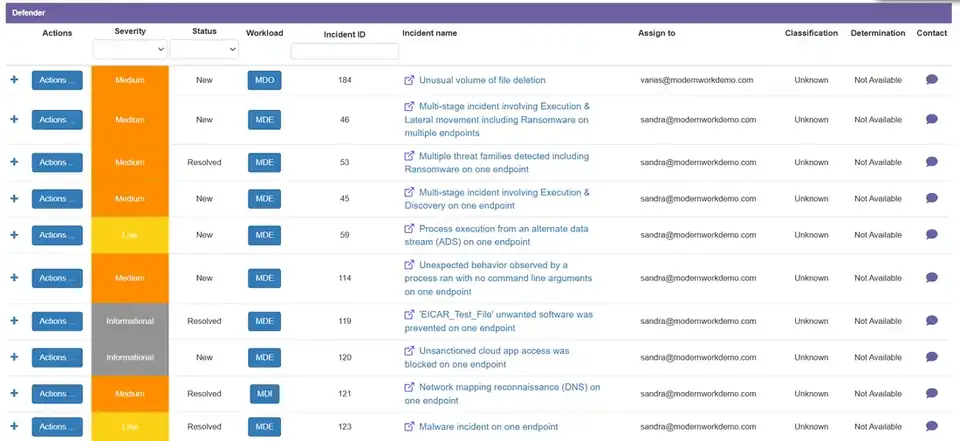
Micro-Vigilant incidents list with severity, status, workload and actions
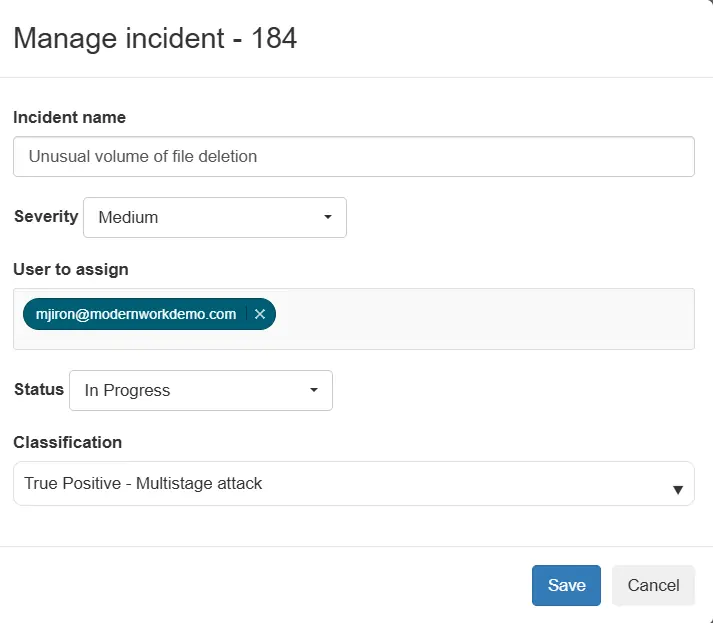
Manage incident
Manage incident panel: name, severity, assigned user, status and classification
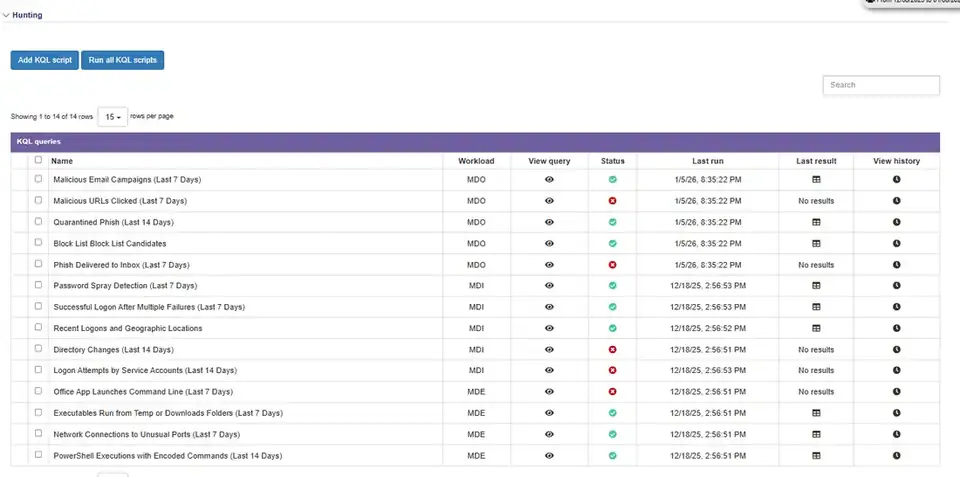
Micro-Vigilant hunting view with predefined KQL queries by workload
Predefined KQL queries, run on demand
Micro-Vigilant activity cards in a Microsoft Teams chat
Activity card with the incident detailsDeep links to the Defender console and the Teams appChatbot, 1:1 chat or channels

Incidents and alerts by severity, status and analyst, at a glance.

How it works

From Microsoft Defender to action

Micro-Vigilant reads incidents and alerts through Microsoft Graph API, filters them by workload, severity, status and frequency, and delivers them where your team already works.

The solution runs inside your tenant, with data provided directly by Microsoft through Microsoft Graph, so sensitive data does not leave your organization.

Role-based experience

The right view for every role

Managers govern the operation. Analysts focus on the incidents assigned to them.

Manager and admin view

Visibility, control and governance

OperateGlobal dashboards across Defender for Endpoint, Identity, Office 365 and Cloud Apps.
ManageAssign and reassign ownership, with role-based views and a dashboard of permission and role changes.
NotifyNotification policies by workload and severity, in Teams and e-mail: instant, daily or weekly.
AutomateExecute actions such as isolate, scan, block, disable and revoke, with a full audit trail.
Micro-VigilantMy organization
Micro-Vigilant dashboard in Microsoft Teams: incidents and alerts by severity, status and analyst
Analyst view

Triage, investigation and response

OperateTriage by severity, workload and status, with deep links and incident summaries in context.
ManageTake ownership, update status, severity and notes, and escalate to the manager with evidence.
NotifyTeams activity cards and @mentions, plus instant, daily and weekly follow-up summaries.
AutomateApprove safe automated actions and verify them by action ID, with configurable approval flows.
Micro-VigilantMyself
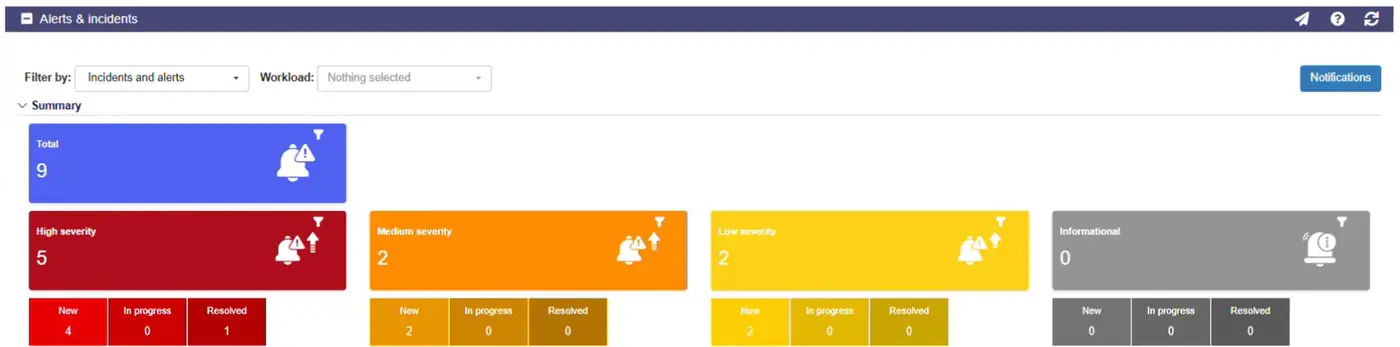
Micro-Vigilant analyst view with the incidents and alerts assigned to the analyst
Human in the loop

Approve, act and prove it

Guided actions and safe automated execution, with approvals where they matter and an audit trail for every step.

01SignalFiltered by workload, event type, severity and audience
02Activity cardGuided actions in Teams: isolate, scan, block, revoke
03ApprovalA person approves before anything runs
04ExecutionAPI call with status check (MachineActionId)
05AuditAction ID, user and timestamp recorded
AI assist

Incident context, in plain language

With Microsoft Security Copilot, Micro-Vigilant adds incident summaries, enrichment and insights to the notifications your team receives in Microsoft Teams: what happened, why it matters and what to do next.

  • Incident summaries for technical and executive audiences
  • Enrichment of the users and devices involved
  • Recommended next steps, inside the notification

Copilot-assisted capabilities require Microsoft Security Copilot and/or Microsoft 365 E5.

Use cases

One app across Microsoft Defender

Examples of how security teams use Micro-Vigilant in each Defender workload.

MDEDefender for Endpoint

Vulnerability remediation

  1. Critical exposure flagged in Teams
  2. Owner assigned by business criticality
  3. Weekly reminders until it is fixed
MDIDefender for Identity

Account compromise response

  1. Identity incident with evidence in Teams
  2. IT approves disable user and reset password
  3. User ID and timestamp logged
MDODefender for Office 365

Quarantine release

  1. Verified false positive reported
  2. Owner and second validator approve
  3. Message released with before/after evidence
MDADefender for Cloud Apps

Cloud app governance

  1. Monthly review shortcut in Teams
  2. Policies tuned and noisy rules disabled
  3. Risky OAuth apps suspended after approval
Measurable business value

Time, cost, risk and optimization

Time

Faster response and lower MTTR

  • Response actions directly from Teams: isolation, scans, restrictions
  • Reminders that prevent delays in handling and follow-up
Cost

Lower operational overhead

  • Less manual effort through automation and role-based workflows
  • Operations centralized in Teams, with less tool sprawl and training
Risk

Reduced exposure, stronger governance

  • Faster remediation and patching shrink the attack surface
  • Role-based workflows with full auditability
Optimization

Simpler, consistent operations

  • Standardized SOC workflows improve consistency
  • Notifications, investigation and action in one place
How to get it

Choose how you acquire Micro-Vigilant

Microsoft Marketplace

A transactable offer in Microsoft Marketplace. Micro-Vigilant is MACC eligible, so the purchase can count toward your Azure consumption commitment.

MACC eligible

Directly from Synergy Advisors

For organizations that want commercial and technical guidance from our experts during adoption.

Through partners

Available from authorized partners through the Microsoft Marketplace partner-to-partner model.

Trial

Evaluate Micro-Vigilant in your environment before a full acquisition.

FAQ

Frequently asked questions

What is Micro-Vigilant?

Micro-Vigilant is a Synergy Advisors E-Suite solution that brings Microsoft Defender incident and alert operations into Microsoft Teams. It gives analysts and managers role-based views, smart notifications and actions they can take from Teams, with full traceability and auditing.

Which Microsoft Defender workloads does it cover?

Microsoft Defender for Endpoint, Microsoft Defender for Identity, Microsoft Defender for Office 365 and Microsoft Defender for Cloud Apps.

Where does Micro-Vigilant run?

The solution is deployed inside your own tenant and receives data directly from Microsoft through Microsoft Graph, so sensitive data does not leave your organization.

Which actions can my team take from Microsoft Teams?

Depending on your configuration and existing automations: isolate a machine, run a quick or full scan, restrict app execution, disable a user, reset a password, close active sessions, block a sender, release a verified false positive and suspend an OAuth app. Every action is verified and logged.

How are people notified?

Through the Micro-Vigilant chatbot, 1:1 chats and channels in Microsoft Teams, with e-mail as a complementary channel. Notifications can be filtered by workload, severity and status, and delivered immediately, daily or weekly.

Does it work with Microsoft Security Copilot?

Yes. With Microsoft Security Copilot and/or Microsoft 365 E5, Micro-Vigilant adds incident summaries, enrichment and insights to the notifications in Teams.

How can we acquire it?

Through Microsoft Marketplace, where Micro-Vigilant is MACC eligible, directly from Synergy Advisors, or through authorized partners. A trial is available.

What do we need to use it?

Microsoft Defender in your tenant and a Microsoft Teams license for each analyst or manager who uses the app.

Talk to our experts

Talk to our Micro-Vigilant experts

Tell us about your security operations. A Synergy Advisors specialist will show you Micro-Vigilant on the Defender incidents that matter to you.

01

Share your contextYour Defender workloads, team and priorities.

02

See it workingA demo on the scenarios that matter to your team.

03

Get startedIn English or Spanish, with our experts alongside you.

We could not process your request. Please try again or write to us.
Thank you. A Synergy Advisors product specialist will contact you shortly.

By submitting this form you agree that Synergy Advisors may contact you about your request. We use Brevo as our marketing platform; your data is processed in line with our Privacy Policy and Brevo's Privacy Policy.

Scroll to Top