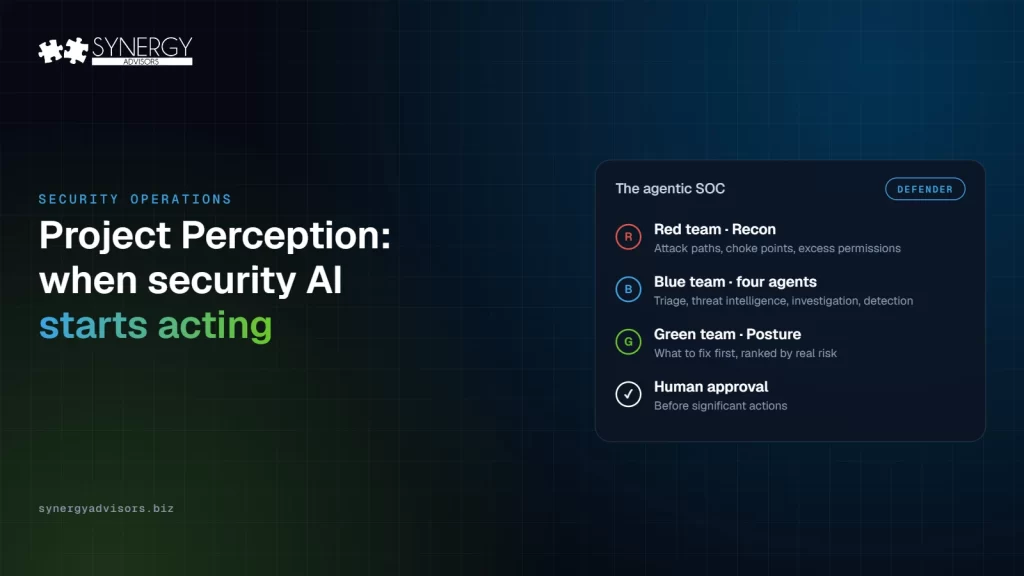

Project Perception is Microsoft’s most concrete step so far toward a SOC where AI agents do part of the work instead of only advising on it. Microsoft describes it as a system that “turns signals into real-time protections using AI to defend against AI.” It was announced on July 27, 2026, entered preview on August 3, and on November 4 got its own community on Microsoft Tech Community, two weeks before Microsoft presents its roadmap at the Ignite conference, starting November 17th in San Francisco, CA.
Today we will look at what Project Perception is, how its sessions and playbooks work, and the decisions I recommend making before your team enables its first agent.
What is Project Perception?
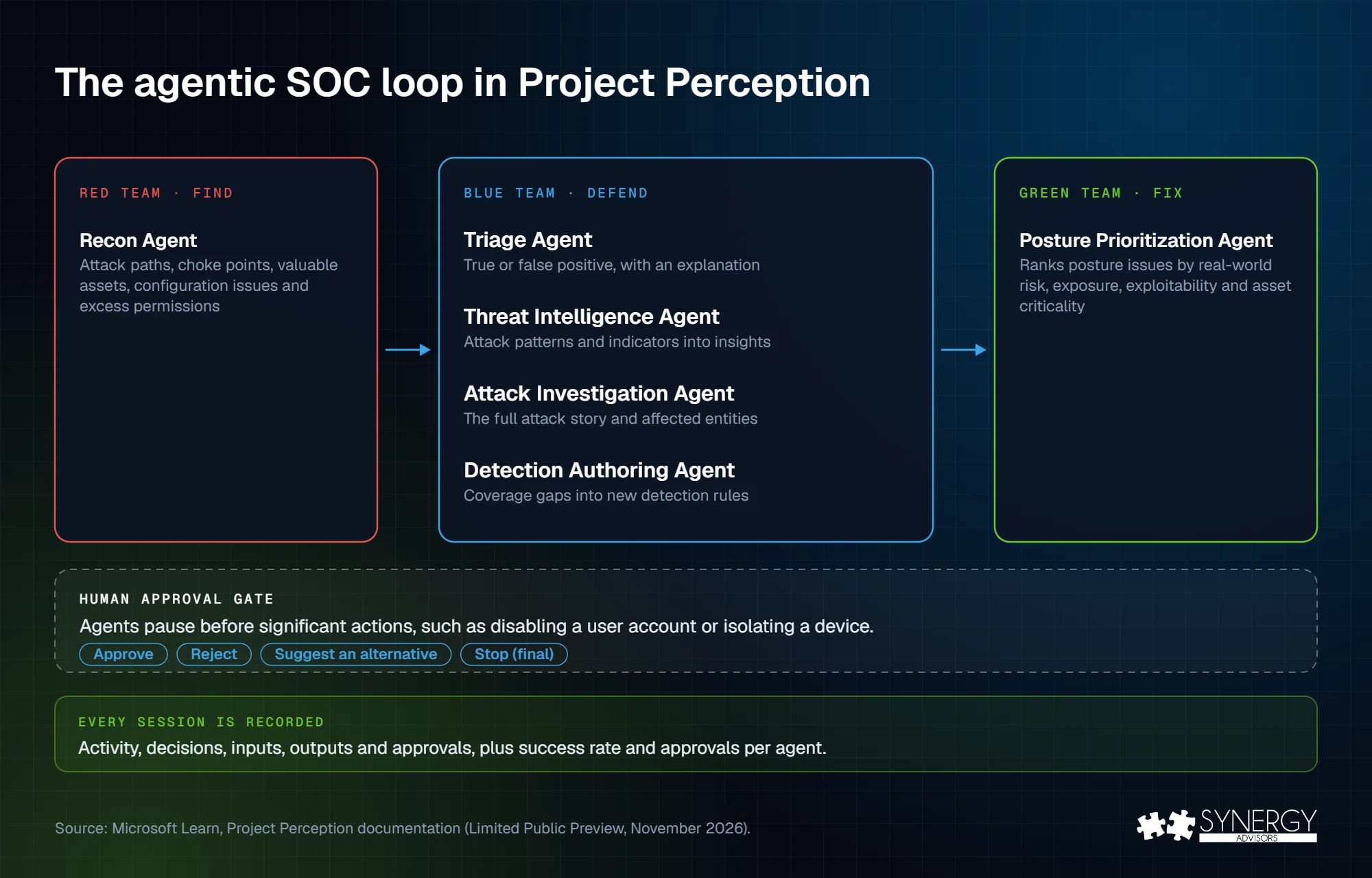
Project Perception is not a new console. It appears in the Microsoft Defender portal and brings teams of specialized AI agents that share context and work together. The names come from security tradition: red teams attack, blue teams defend, green teams fix. People set the objectives and guardrails, and approve the actions that matter. Here are the agents available at the time of this writing:
| Team | Agent | What it does |
|---|---|---|
| Red | Recon Agent | Scouts your environment the way an attacker would: attack paths, choke points, valuable assets, configuration issues and excess permissions |
| Blue | Triage Agent | Classifies alerts as true or false positives and explains its conclusion |
| Blue | Threat Intelligence Agent | Extracts attack patterns and indicators and turns them into defense or response insights |
| Blue | Attack Investigation Agent | Reconstructs the full attack story: verdicts, timeline, techniques, indicators and affected entities |
| Blue | Detection Authoring Agent | Finds gaps in threat coverage and writes detection rules |
| Green | Posture Prioritization Agent | Ranks posture issues by real-world risk, exposure, exploitability, and asset criticality, and advises what to fix first |
Agents can work alone or chained in playbooks, where each agent’s output feeds the next. In this release, Microsoft provides seven playbooks and customers cannot edit them: Triage alert, Protect against a threat, Investigate attack, Extract threat intelligence, Identify attack paths, Plan for posture remediation, and Assess identity risks.
Where it stands today
- Availability: Limited Public Preview, by invitation, for a defined preview window. As with anything released in Preview, the product may change before release.
- Models: Microsoft’s specialized cyber model, MAI-Cyber-1-Flash, runs first in MDASH, its multi-model system for vulnerability management. Microsoft reports a 96% score on the CyberGym benchmark for that combination; it is a vendor figure measured in a test harness, not in a production environment.
- Cost: Perception is billed in Security Compute Units, the same model as Security Copilot, and each agent consumes them at a different rate. Unit prices have not been published at the time of this writing.
How a Perception session works
Everything in Perception happens in a session: the record of one piece of work, from the request to the result, including the agents’ decisions, inputs, outputs, and any human approval. There are three ways to start one:
- Chat: describe the goal in natural language and Perception selects the agents and playbooks.
- Agents: run one agent directly when you know exactly what you need, such as triaging a specific alert.
- Playbooks: run an end-to-end workflow, where each agent’s output feeds the next. Every agent in the playbook must be set up first.
While a session runs, the team can follow the agents’ work and the artifacts they produce; when it ends, the results appear in its outputs. Each agent also shows its success rate, the approvals it received and how often it started on its own, so you can judge every agent with data before you trust it with more.
For SOC leaders, the daily review changes: instead of going through alerts one by one, they review sessions, what the agents concluded, what they propose to do next, and what still needs a person. We explained the broader move from assistance to execution in Beyond Copilot. Perception is where Microsoft is bringing that idea into the Defender portal.
The human stays in the loop, by design
Perception agents pause and ask before significant actions. Microsoft gives disabling a user account and isolating a device as examples. They also pause when they need more information or when there are several ways forward. The analyst can approve, reject, suggest an alternative, or stop the session. Stopping is final: a stopped session cannot be resumed. Every session keeps a record of activity, decisions, inputs, outputs, and approvals.
One caution: an approval button is not a change-control process. Isolating a laptop during an attack can be the analyst’s call. A new detection rule in production, or a code fix proposed by an agent, should follow the same approval path as a change made by a person. Decide this before the preview starts, not during the first incident. In the SOCs we support, the slowest step is rarely detection; it is deciding who may act on it.
Five decisions to make before you enable the first agent
| Decision | Why it matters | What our experts recommend |
|---|---|---|
| 1. Unified RBAC and scopes | Perception requires Defender unified role-based access control across all workloads. If an agent can see fewer scopes than the analysts using it, sessions fail or return incomplete results. | Turn on unified RBAC first. List the Defender for Endpoint device groups each agent must see: that access is assigned manually. |
| 2. Agent identities | The setup wizard creates a Microsoft Entra Agent ID for each agent and lists the minimum permissions it needs. | Treat each agent identity like a privileged account: a named owner, periodic review and monitoring. See AI Agent Identity. |
| 3. Approval matrix | Agents pause before significant actions, and whoever has the portal open can approve. | Define by type of action who approves, and when your change process applies. |
| 4. Starting agents | Microsoft recommends the Threat Intelligence and Triage agents first: limited permissions, immediate value. | Start with agents that read and recommend. Add Recon and Detection Authoring once your approvals work. |
| 5. Metrics and cost | Each agent shows its success rate, approvals granted and automatic starts. Compute is consumed per task. | Set a baseline before the preview: time to acknowledge, time to resolve, false positive rate and stale incidents. Then measure compute per session. |
Roles matter too. In Perception, a Security Admin installs, configures, and removes agents, and a Security Reader can start and use sessions. Review who holds each role before the agents arrive.
What Perception does not replace
- Your operating model. Someone still owns the queues, priorities, and escalations. Agents add capacity only if you know where your SOC is stuck today.
- Coverage. Agents reason over what your Microsoft security tools can see. Devices that are not onboarded and logs that are not kept are blind spots for agents too.
- Governance of your own agents. Microsoft has also extended Perception to supervise the agents that work inside your organization. I covered that topic in my previous blog post Agentic Insiders.
Attackers are already automating. In the Storm-0940 campaign, an AI agent framework reached privileged access in about three hours. Defending at that speed requires agents, but also the guardrails that let you trust them.
How our experts help
- The Micro-Vigilant SecOps Agent shows how your SOC performs today, from workload and stale incidents to detection quality, with Microsoft Defender XDR data. It is the baseline you need to measure any agent against.
- Our Managed Services run a 24x7x365 SOC with MXDR on Microsoft Defender XDR and Microsoft Sentinel, including the approvals and change control around automated actions.
- Before the preview, our experts can review your unified RBAC, scopes, agent identities and approval matrix, so your first sessions do not fail for reasons that have nothing to do with AI.
Frequently asked questions
What is Microsoft Project Perception?
An agentic security system in Microsoft Defender. Teams of specialized AI agents (red, blue and green) find exposure, investigate threats and strengthen defenses, while people approve significant actions.
Is Project Perception generally available?
No. In November 2026, it is a Limited Public Preview by invitation. Microsoft will present its roadmap at Ignite on November 17, 2026.
Can we create our own playbooks?
Not in this release. Microsoft provides seven playbooks and manages them: customers cannot create, edit or delete them. You can still run agents one by one, or describe the goal in Chat.
What do I need to use it?
Access to the Microsoft Defender portal, unified RBAC across Defender workloads, at least one Security Admin to set up agents, and agent identities with access to every scope they need.
Next step
Synergy Advisors SecOps experts can help you get ready for agentic security without losing control of your SOC. Join the Protect the Agentic Enterprise webinar on Tuesday, December 15, at 2:00 p.m. ET, or talk to our experts.
Sources
- Introducing the Project Perception Community Microsoft Tech Community, November 4, 2026
- Rethinking security for the age of AI Official Microsoft Blog, July 27, 2026
- Get started with Project Perception Microsoft Learn
- Key concepts in Project Perception Microsoft Learn
- Approve, reject, or stop agentic work Microsoft Learn
- Microsoft’s Latest Security Play: Project Perception Directions on Microsoft